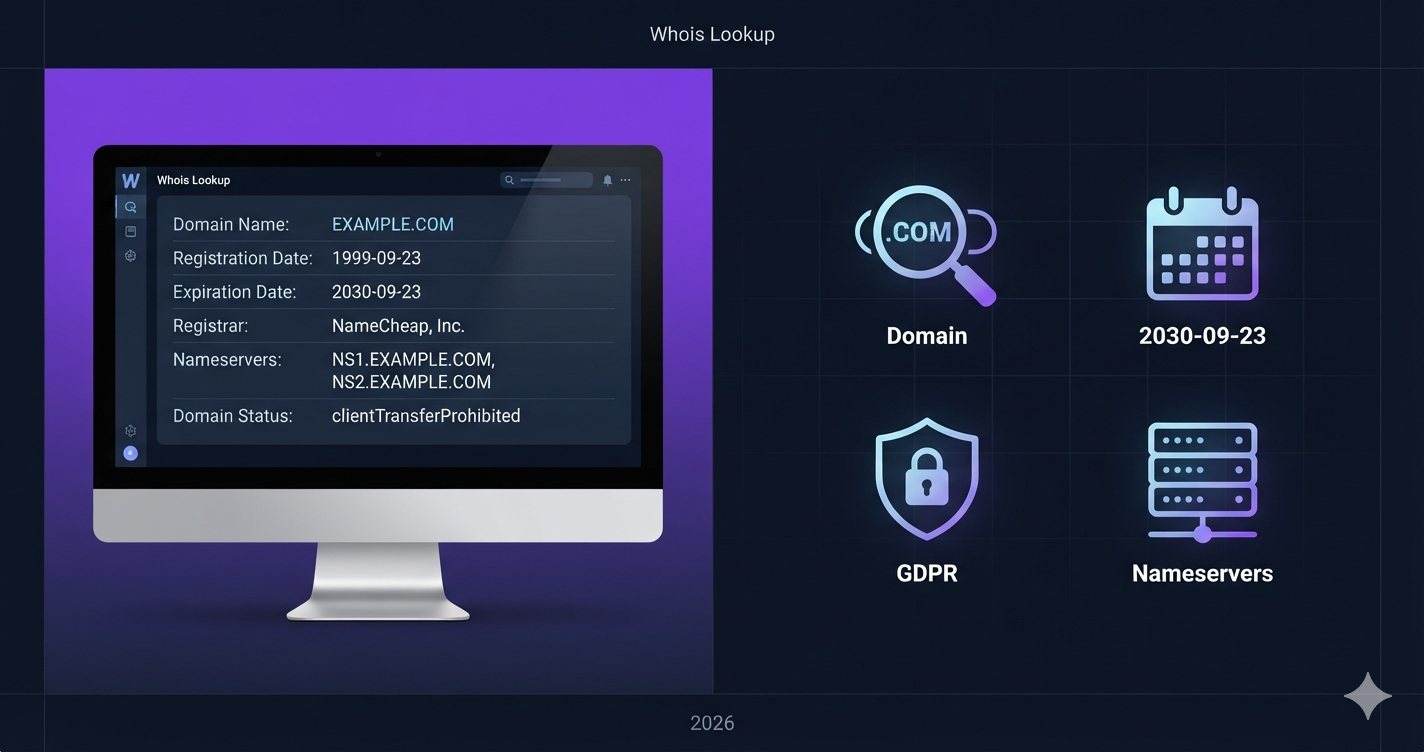
What Is Whois Lookup? Complete Guide to Domain Registration Data (2026)
Learn what Whois lookup is, how to check domain registration data, expiry dates, and ownership. Complete 2026 guide with free Whois lookup tool.
Check Domain Registration →📌 The 2026 Update: WHOIS Is Dead, RDAP Is Here
On January 28, 2025, the original WHOIS protocol was officially retired and replaced by RDAP (Registration Data Access Protocol). RDAP provides structured JSON responses, HTTPS encryption, and GDPR-compliant tiered access. The term "Whois lookup" is still commonly used even when the tool queries RDAP.
Rankcept's Whois Lookup uses RDAP to deliver structured, reliable registration data.
📖 Table of Contents
- 1. What Is Whois Lookup?
- 2. The 2026 Update: WHOIS Is Dead, RDAP Is Here
- 3. What Does a Whois Lookup Show?
- 4. How to Use Whois Lookup — Step by Step
- 5. Whois Lookup for SEO: What Actually Matters
- 6. How to Check Domain Age
- 7. How to Find Who Owns a Domain
- 8. Whois Privacy and GDPR — What Changed
- 9. Common Use Cases for Whois Lookup
- 10. Domain Status Codes Explained
- 11. Whois Lookup for Security
- 12. Frequently Asked Questions
1. What Is Whois Lookup?
Whois lookup (pronounced "who is") is a query tool that retrieves registration information about a domain name from an internet database. When anyone registers a domain — whether it's yourwebsite.com or a competitor's domain — their registrar is required by ICANN (the organization that coordinates domain names globally) to record information about the registration.
Whois lookup lets you query that record.
The term "Whois" comes from the literal question the early protocol asked: "Who is responsible for this domain?" It was developed in the early 1980s as a simple directory service for network administrators who needed to know who to contact about a domain.
Decades later, Whois evolved from a technical tool into an essential resource for:
- Website owners checking their domain expiry dates
- SEO professionals evaluating domain age and trust
- Security researchers investigating suspicious domains
- Businesses checking if a domain is available to purchase
- Journalists and investigators identifying domain ownership
- Developers troubleshooting DNS and configuration issues
2. The 2026 Update: WHOIS Is Dead, RDAP Is Here
This is the most important change in domain lookup history, and most website owners don't know about it.
What Happened?
On January 28, 2025, ICANN officially sunset the WHOIS requirement for generic top-level domains. The replacement — RDAP (Registration Data Access Protocol) — became the mandatory standard.
The numbers tell the full story: WHOIS queries dropped 60% between January and August 2025, while RDAP queries jumped from 7 billion to 65 billion per month. By June 2025, RDAP had completely overtaken WHOIS. By September 2025, 374 gTLDs had shut down their WHOIS services entirely.
Why Did WHOIS Get Replaced?
The original WHOIS protocol had critical limitations that became increasingly problematic:
- No encryption: All queries and responses traveled in plain text, making them vulnerable to interception.
- No standardized format: Every registrar returned data in a different format, making automated processing unreliable and inconsistent.
- No access controls: WHOIS was completely open, making it easy for spammers to scrape millions of email addresses from domain registration records.
- GDPR incompatibility: The EU's General Data Protection Regulation (2018) required protecting personal data — but WHOIS had no mechanism to restrict access to specific fields.
What Is RDAP?
RDAP solves all of these problems:
- Structured JSON responses — consistent, machine-readable format across all registrars
- HTTPS encryption — all queries and responses are encrypted
- Tiered access control — different levels of data visibility for public users, authenticated researchers, and law enforcement
- GDPR compliant by design — personal data can be redacted for public queries while remaining accessible through proper channels
What This Means for You
If you use a Whois lookup tool, it may be running on RDAP under the hood while still calling it "Whois" — which is fine. The term "Whois lookup" has stuck even as the underlying protocol changed. What matters is that the tool uses RDAP for current, accurate results.
Rankcept's Whois Lookup uses RDAP to deliver structured, reliable registration data.
3. What Does a Whois Lookup Show?
A Whois/RDAP lookup returns several categories of information. Some fields are always publicly visible; others may be redacted depending on privacy settings and GDPR regulations.
Always Visible (Public)
- Domain Name — The exact registered domain you queried.
- Registrar — The company through which the domain was registered.
- Registration Date (Created) — When the domain was first registered.
- Expiration Date — When the current registration runs out.
- Last Updated Date — When the domain record was last modified.
- Nameservers — The DNS servers responsible for the domain.
- Domain Status Codes — Technical flags that describe the domain's current state.
- IANA Registrar ID — A unique identifier for the registrar in ICANN's database.
Sometimes Visible (Depends on Privacy Settings and Jurisdiction)
- Registrant Name — The person or organization that registered the domain. Since GDPR (2018), this is typically redacted for individual registrants.
- Registrant Organization — The business name associated with the registration.
- Registrant Contact Details — Email address, phone number, and physical address. Almost always redacted since GDPR.
- Admin/Tech Contact — Contact information for administrative and technical management of the domain.
Example Whois Result (Post-GDPR, Typical):
Domain Name: EXAMPLE.COM
Registrar: GoDaddy.com, LLC
Registrar IANA ID: 146
Registration Date: 1995-08-14
Expiration Date: 2026-08-13
Updated Date: 2024-01-08
Nameservers: NS1.EXAMPLE.COM | NS2.EXAMPLE.COM
Domain Status: clientDeleteProhibited | clientTransferProhibited
Registrant: REDACTED FOR PRIVACY
Registrant Email: [Redacted - contact form at registrar]
4. How to Use Whois Lookup — Step by Step
Using Rankcept's Free Whois Lookup
- Go to rankcept.com/whois-lookup
- Enter the domain name you want to check (e.g.,
example.com)
No need to includehttps://orwww. - Click Lookup
- Review the results:
- Registration date → domain age
- Expiration date → when to renew
- Registrar → who manages the domain
- Nameservers → hosting/DNS provider
- Status codes → domain health
What to Check on Your Own Domain
- ✅ Expiration date has at least 12 months remaining
- ✅ Auto-renewal is active (verify with your registrar)
- ✅ Nameservers point to your current hosting provider
- ✅ Status codes don't include unexpected locks
- ✅ Registrant contact info is accurate behind privacy protection
What to Check on Competitor Domains
- 📅 Registration date → how established are they?
- ⏰ Expiration date → are they actively maintaining it?
- 🌐 Nameservers → what hosting/CDN provider do they use?
- 🔒 Status codes → are transfer locks enabled?
5. Whois Lookup for SEO: What Actually Matters
Domain Age and Google Trust
Domain age is a factor in how much authority and trust Google assigns to a website. Older domains accumulate more authority over time through earned backlinks, established indexing history, and proven reliability.
What Whois tells you:
- Registration date → true domain age
- Expiration date → how far into the future the registration extends
Does Whois Privacy Hurt SEO?
No. Google does not use Whois registrant data as a ranking factor. Privacy protection simply hides your personal details from public lookups — it has zero impact on indexing, crawling, or ranking.
Check your DNS configuration with DNS Lookup and your SSL status with SSL Lookup — these are the domain health checks that actually affect rankings.
6. How to Check Domain Age
Domain age is the difference between the current date and the domain's registration date in Whois records.
- Go to Rankcept's Whois Lookup
- Enter the domain name
- Look for "Registration Date" or "Created" in the results
- Calculate the age from that date to today
| Age | Interpretation |
|---|---|
| Under 6 months | New site — Google still building trust |
| 6-12 months | Early stage — trust building in progress |
| 1-3 years | Established — meaningful domain authority |
| 3-10 years | Trusted — significant SEO advantage |
| 10+ years | Highly trusted — significant organic presence |
Important Distinction: Registration Age vs Ownership Age
A domain might have been registered in 2005 (old registration date) but changed ownership multiple times. Google primarily considers the continuity of content and links, not just the technical registration date.
7. How to Find Who Owns a Domain
In 2026, finding a domain owner is more complicated than it used to be.
Post-GDPR Reality
For most domains, personal contact information is now redacted from public Whois records. A typical result shows:
Registrant: REDACTED FOR PRIVACY
Registrant Email: [contact form URL]
What You Can Still Find
- The registrar — who manages the domain
- A contact form or proxy email — to reach the owner through the registrar
- Organization name — corporate registrants often still show company names
- Country code — approximate location
How to Contact a Domain Owner
- Run a Whois lookup on rankcept.com/whois-lookup
- Find the registrar in the results
- Use the contact/proxy email listed in the Whois record
- Or visit the registrar's website and use their owner contact service
8. Whois Privacy and GDPR — What Changed
What Is Whois Privacy Protection?
Whois privacy replaces your personal contact information in public Whois records with generic proxy details from the registrar.
What GDPR Changed
- Most registrars now redact personal data by default
- Individual registrants see maximum redaction
- Corporate registrants may show company name and country
- "REDACTED FOR PRIVACY" became the standard response
| Category | With Privacy | Without Privacy (EU) | Without Privacy (non-EU) |
|---|---|---|---|
| Name | Hidden (proxy) | Hidden (GDPR) | Potentially visible |
| Hidden (proxy) | Hidden (GDPR) | Potentially visible | |
| Phone | Hidden (proxy) | Hidden (GDPR) | Potentially visible |
| Address | Hidden (proxy) | Hidden (GDPR) | Potentially visible |
| Registration date | Visible | Visible | Visible |
| Expiry date | Visible | Visible | Visible |
| Registrar | Visible | Visible | Visible |
| Nameservers | Visible | Visible | Visible |
9. Common Use Cases for Whois Lookup
- Checking your own domain's expiry — prevents lapses
- Researching a domain before buying — age, registrar, history
- Competitor research — domain age, nameservers, registrar
- Verifying a website's legitimacy — registration date and registrar
- Finding contact information for domain purchases — proxy contact method
- Monitoring your domain portfolio — expiry dates, status codes
- Brand protection — monitoring for cybersquatting
- Technical troubleshooting — nameserver configuration
10. Domain Status Codes Explained
Active / OK
Status: ok — The domain is active, functioning normally.
Client Locks (Set by Registrar)
clientTransferProhibited— Domain cannot be transferred without removing lock.clientDeleteProhibited— Domain cannot be deleted without removing lock.clientUpdateProhibited— Domain information cannot be changed without authorization.clientRenewProhibited— Domain cannot be renewed — usually indicates a dispute or legal hold.
Server Locks (Set by Registry)
serverTransferProhibitedserverDeleteProhibitedserverUpdateProhibited
Higher-level locks set directly by the domain registry. These override registrar-level settings.
Redemption and Deletion Period
redemptionPeriod— Domain has expired and is in a 30-day recovery window.pendingDelete— Domain is about to be released back to the public pool.pendingTransfer— A transfer between registrars is in progress.
11. Whois Lookup for Security
Identifying Phishing Domains
Phishing attacks frequently use newly registered domains. A domain registered within the last 30 days that claims to be a bank or government agency is almost certainly malicious.
Cybersquatting Detection
Regular Whois monitoring of your brand name and common misspellings catches cybersquatters early.
Domain Hijacking Prevention
Monitor your Whois record regularly to confirm that your nameservers haven't been changed and no unauthorized transfer is in progress.
Verifying SSL Certificate Ownership
Certificate authorities sometimes use Whois email records for domain control verification. Keeping your registration details accurate ensures you can complete these verification steps.
🔧 Related Free Tools
Complete your domain and website analysis with these free tools:
12. Frequently Asked Questions
Whois lookup is a query tool that retrieves registration information about a domain name — including who registered it, when it expires, what registrar manages it, and which nameservers it uses. The underlying protocol was replaced by RDAP in January 2025, but the term "Whois lookup" remains in common use.
Yes. Rankcept's Whois Lookup is completely free with no limits and no signup required.
Since GDPR (2018), most personal contact information is redacted. You can typically see the registrar and a proxy contact method, but not the owner's personal name or email directly. Corporate registrants may still show their company name.
No. Whois privacy has zero impact on search engine rankings. Google does not use Whois registrant data as a ranking factor.
RDAP (Registration Data Access Protocol) replaced WHOIS as the required standard for generic top-level domains on January 28, 2025. RDAP provides structured JSON responses, HTTPS encryption, and GDPR-compliant tiered access.
Run a Whois lookup on your domain at rankcept.com/whois-lookup. The expiration date appears under "Expiry Date" or "Registration Expiry Date."
Status codes are technical flags set by the registrar or registry. Common ones include clientTransferProhibited (transfer protection active) and ok (general active status). Unusual codes like redemptionPeriod indicate the domain has expired and is in a recovery window.
Either the domain owner purchased privacy protection, or GDPR regulations automatically redacted their personal data. You can reach the owner through the proxy contact details shown in the Whois result.
Run a Whois lookup and find the "Registration Date" or "Created" field. The difference between that date and today is the domain's age.
Domain age is a minor contributing factor to overall domain authority rather than a direct ranking signal. Older domains tend to accumulate more authority through earned backlinks and established history.
Both retrieve domain registration data, but RDAP uses HTTPS encryption, returns structured JSON data, and supports GDPR-compliant access controls. WHOIS used plain text and had no encryption.
Check your own domain's Whois record at minimum every 3 months to verify the expiry date, nameservers, and status codes. Set a calendar reminder 60 days before expiry.
Check Any Domain's Registration Data Instantly
Verify domain expiry, age, nameservers, and status — completely free, no signup required.
🔍 Start Whois Lookup →Disclaimer: This guide is for educational purposes. Domain registration data may vary based on jurisdiction and registrar policies.